Pages

Tampilkan postingan dengan label update. Tampilkan semua postingan

Jumat, 03 Januari 2014

How to Update Galaxy Tab 2 7 0 P3100 with Android 4 2 2 XWDMK1 Jelly Bean Official Firmware

Samsung Galaxy Tab 2 7.0 with model number GT-P3100 has received the latest Android 4.2.2 Jelly Bean update with firmware build number P3100XWDMK1. The new official firmware is now available as an Over-The-Air (OTA) update as well as through Samsung KIES.

Firmware details
PDA: P3100XWDMK1
CSC: P3100RXEDMK4
MODEM: P3100XXDMF2
Version: Android 4.2.2
Build date: Nov 07, 2013
Regions: Russia, Kazakhstan, Ukraine, Uzbekistan

Samsung Galaxy Tab 2 7.0 P3100 users who missed the OTA update notification or unable to access the update over Samsung KIES, and those who are residing outside the supported regions can now download and install the same manually, using our step-by-step guide.

Pre-requisites
1. Install USB Drivers for Samsung Galaxy Tab 2 7.0 on the computer.
2. Enable USB Debugging Mode on your tablet by navigating to Settings >> Developer Options.
3. Make a backup of all your important data before following the guide.
4. The Galaxy Tab 2 7.0 should be factory unlocked and not locked to any particular carrier.
5. Ensure the battery of the tablet is charged more than 80 percent.
6. The Android 4.2.2 XWDMK1 Jelly Bean firmware is compatible only with the 3G version of the Samsung Galaxy Tab 2 7.0 (GT-P3100). Applying this to any incorrect variant might brick the device. Verify the model number of the Galaxy Tab 2 7.0 by navigating to Settings >> About Phone.

Files Required
1. Android 4.2.2 XWDMK1 Jelly Bean Firmware (Mirror Link 1, Link 2)
2. Odin 3.07

Steps to Update Galaxy Tab 2 7.0 P3100 with Android 4.2.2 XWDMK1 Jelly Bean Firmware
Step 1: Extract Firmware zip file using winrar/7zip/winzip or any other extracting tool, you will get a .tar.md5 file and some other files (optional).
Step 2: Extract Odin zip file and you will get Odin3 v3.07.exe along with few other files.
Step 3: Switch off Galaxy Tab 2 7.0.
Step 4: Boot the device into Download Mode by pressing and holding Volume Down and Power buttons together until a construction Android robot icon with a warning triangle appears on screen. Now press the Volume Up button to enter Download Mode.
Step 5: Run Odin on the computer as an Administrator.
Step 6: Connect the Galaxy Tab 2 7.0 to the computer using USB cable while it is in the Download Mode. Wait until Odin detects the device. When the device is connected successfully, the ID: COM box will turn to light blue with the COM port number. Additionally, the successful connected will be indicated by a message saying Added.

Note: If the Added message does not appear, then try re-install USB drivers or changing the port on the computer.

Step 7: Select the following files in Odin from extracted P3100XWDMK1 firmware folder:
  • Click the PDA button and select the .tar.md5 file.
  • Click the Phone button and select file with MODEM in its name. Ignore if there is no such file.
  • Click the CSC button and select file with CSC in its name. Ignore if there is no such file.
  • Click the PIT button and select the .pit file. Ignore if there is no such file.
Step 8: In Odin, enable Auto Reboot and F. Reset Time checkboxes. Also, ensure the Re-Partition checkbox is chosen only if a .pit file was chosen in the previous step.
Step 9: Verify everything suggested in Step 7 and Step 8 is done correctly. Then hit the Start button to begin the installation process.
Step 10: Once the installation process is completed, your device will restart and soon you will see a PASS message with green background in the left-most box at the very top of the Odin. You can now unplug the USB cable to disconnect your tablet from the computer.

Samsung Galaxy Tab 2 7.0 P3100 should be now updated with the Android 4.2.2 XWDMK1 Jelly Bean official firmware. Head over to Settings >> About Phone to verify the software version running on the device.

Note: If Galaxy Tab 2 7.0 P3100 stuck at booting animation after Step 10 then go to recovery mode (press and hold the Volume Up and Power buttons together) and perform Wipe data/Factory Reset and Wipe Cache Partition task before selecting reboot system now function. In recovery mode use Volume keys to navigate between options and Power key to select the option. Please note, performing wiping task will erase your device internal memory data and not external SD card data.

Click here to know How to Root Galaxy Tab 2 7.0 P3100 running on Android 4.2.2 Jelly Bean firmware.
Read More..

Senin, 22 Juli 2013

SMS Diversion Pro apk Update


SMS Diversion Pro apk

Current Version : 1.33
Requires Android : 2.1 and up
Category : Communication
Size : 562k

Original Post From http://www.blogspot.com


SMS Diversion Pro apk Description


*** Destination phone number 10-digit limitation has been removed in order to support countries that need more ***

Forgot your phone at home? Can't take it to work? SMS Diversion will forward all text messages to your Gmail account or any other phone that you specify. Can also forward name and number of missed calls with contact list integration. Forgot to turn SMS Diversion on before leaving? No problem, remote activation allows for turning forwarding on or off by sending a predefined text message to your phone! Does not support MMS.
***Uninstall free version before downloading Pro version.***

* Forward SMS to Gmail
* Forward SMS to another phone
* Forward name and number of missed calls
* Remote on/off
* Contact list integration
* Forward to any email account
*** Does not support MMS***


SMS Diversion Pro apk Videos and Images


Read More..

Sabtu, 20 Juli 2013

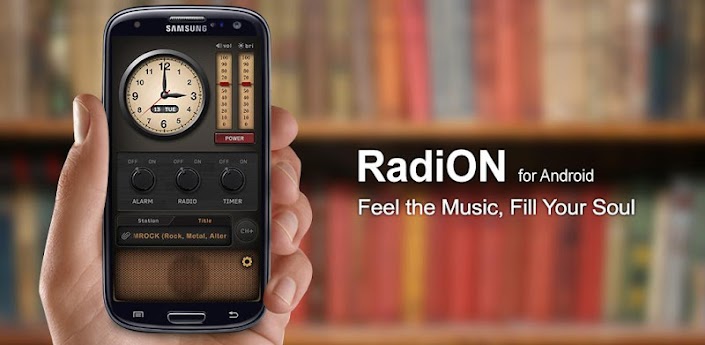
RadiON v3 0 7 Build 44 Update Apk Full App

RadiON v3.0.7 Build 44 Update
Requirements: 2.2+
Overview: ★ Listen to 50,000 stations from around the world!

[break]
English, Español, Français, Deutsch, Italiano, Nederlands, Dansk, Türk, 中文简体, 中文繁體, 日本語, 한국어
1 App in Brazil, Japan, South Korea, Belgium, France, Spain, Hungary, Lithuania and Taiwan
2 App in France, Germany, Italy, Czech, Belgium and Uganda
5 App in Spain, Poland, Austria, Greece, Brazil, Russia, Luxembourg, Nigeria, Netherlands, St. Lucia and Trinidad Tobago
1 Music App in 54 countries
Recommended by
USA TODAY : usat.ly/RadioToday
Gizmodo : bit.ly/RadioGizmodo
Appsafari Rating 4.5/5 : bit.ly/RadioSafari
Features:
✔ Radio
Listen to 50,000 radios stations from around the world
Antique-style theme provided
Search for stations by keyword
Display song information (title/singer)
Control brightness / Volume
Listed stations by country
Listed stations by Top 100
Sleep Timer Supported
✔ Alarm
Can set the ‘Radio Channel’ alarm sounds
Shake to turn off the alarm
Support for multiple alarms
Fully configurable snooze time interval
Alarm sound with vibration
Set “Fade In/Fade Out” time
Set number of “Shakes”
What’s in this version:
- Theme1 clock date bug fixes
- Facebook login when bug fixes of an abnormal termination
- Nexus 4 Resolution (1280×768) bug fixes
This app has no advertisements
More Info:
Code:
https://play.google.com/store/apps/details?id=com.ensight.android.radioalarmclock
Download Instructions:
http://ul.to/qnlk13bc
Read More..

Linked Contact apk Update Version


Linked Contact apk
Linked Contact apk

Current Version : 1.12
Requires Android : 1.5 and up
Category : Communication
Size : 249k

Original Post From http://www.blogspot.com


Linked Contact apk Description


Easily sync LinkedIn connection pictures to the phone contacts!

Each connection can be added as a new contact or linked to an existing contact. Once they linked, with single touch, all the pictures can be sync to the phone. You will never miss your connection updated picture.

Buttons:
"Add": add the connection as a new contact. Single touch to add it to the contact book.
"Select": select a contact to link to the connection "Sync": sync the connection picture to the linked contact. Be aware that the previous icon will be gone.
"Unlink": remove the link to the contact

Tap the connection name to view connection detail: title, industry, experience, educations...

Tap the contact name to edit the contact directly

Menu
"Reload connections": reload all the connections and their pictures
"Sync All Pictures": sync all the linked connections and contacts

To make the contact selection easy
press menu to display all contacts or just the contacts with phone numbers
type a letter in search box to narrow the list.

If you need more time to test, please let us know and we are quite flexible.

Feedback is highly appreciated!

Enjoy!


Linked Contact apk Videos and Images


Read More..